
Everything your team needs to log time, right where the work is.
Time Log adds a tab to every work item, a weekly timesheet, reports for team leads and controls for admins. No separate app, no migration.
Log a whole week without opening a single ticket.
My Time Log is your personal weekly timesheet: every work item, every day, one grid. Add, edit and delete inline and watch your progress against a weekly target.
Watch: Your weekly timesheet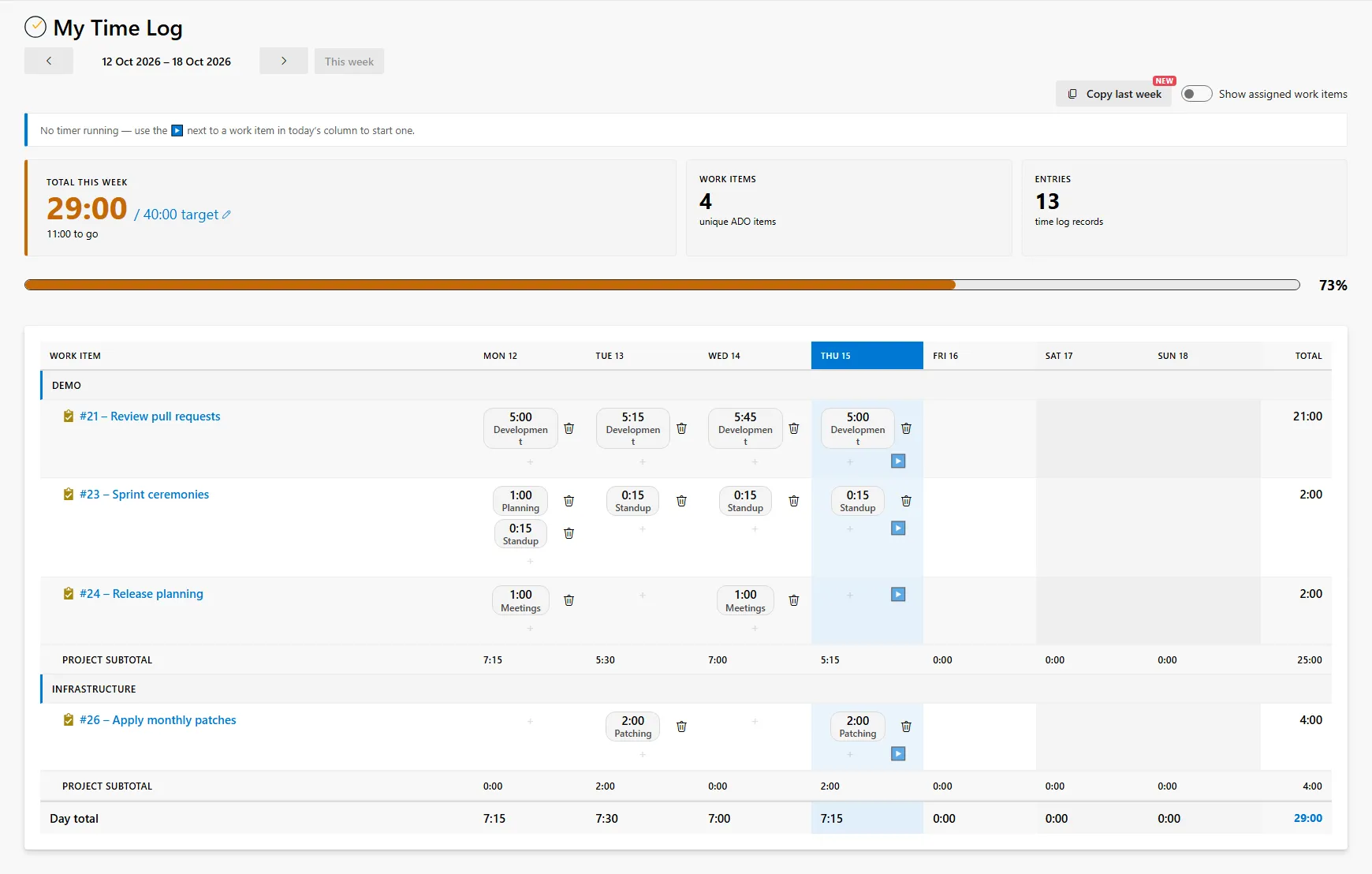
A Time Log tab on every work item
Estimate, completed and remaining at the top. Log in a few clicks with quick durations and the last seven days.
Watch the videoA timer that runs as you work
Start it from My Time Log or the work item and record time as it is spent, not remembered on Friday.
Watch the videoSeveral days at once
Press each day the work was done and Time Log creates one entry per day.
Watch the videoCopy last week, day for day
My Time Log offers last week's entries for this week. Review them, untick what changed, and save.
Completed and Remaining, automatically
Every entry updates the work item, so burndowns and capacity planning reflect real progress.
Many people, one work item
Pair programming and team ceremonies: each person's time is kept separately with a combined total.
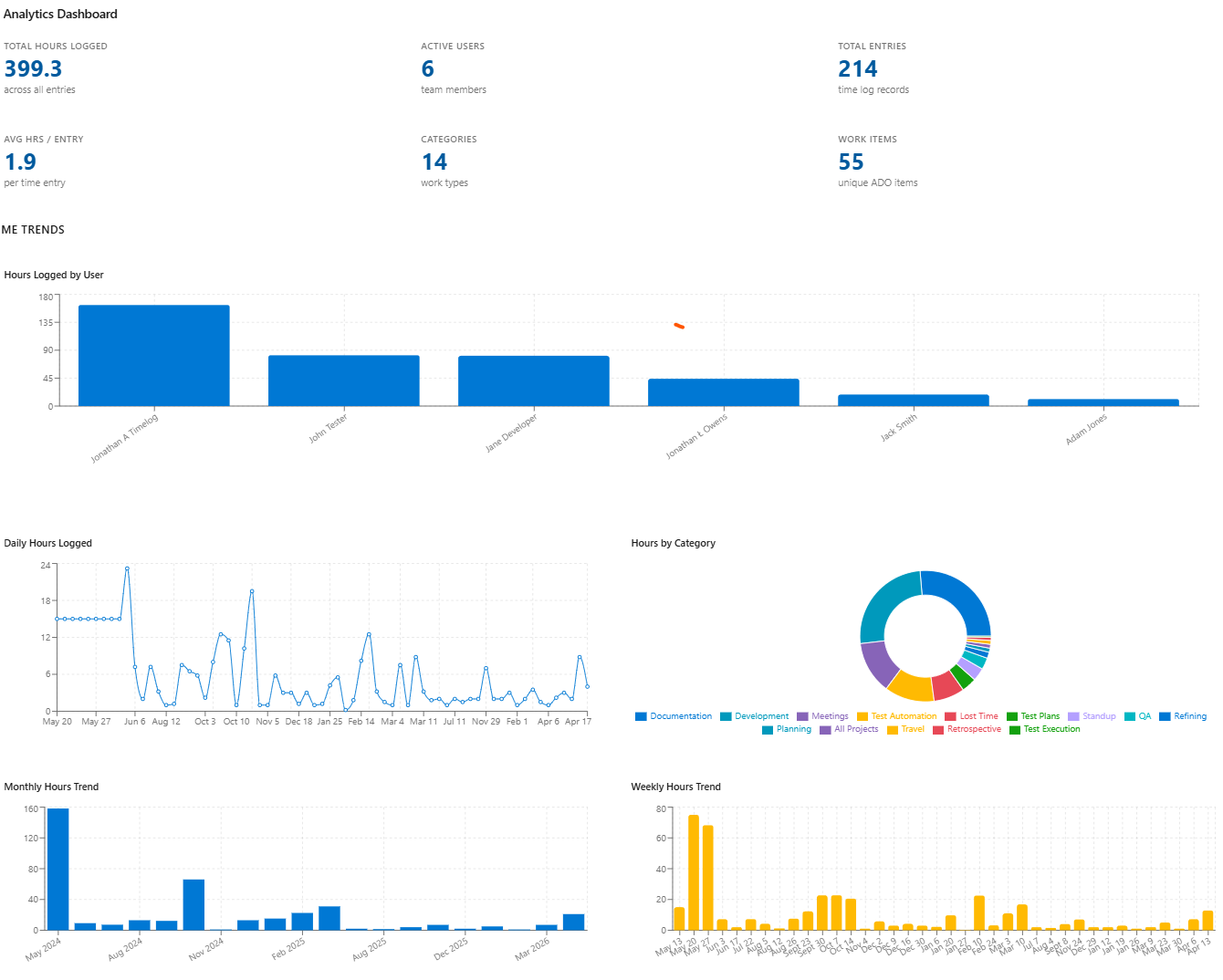
Know where every hour went, and who is short before Friday.
The Analytics Dashboard, the Summary and the weekly shortfall report all read the same time your developers log, so they are always current.
Watch: Who logged whatTime Log Summary
Group by project, area path, iteration, person or work item, across several projects at once. Export to CSV.
Watch the videoWeekly shortfall report
Everyone below their weekly target for any week, with days off from Azure DevOps capacity taken into account.
Watch the videoWhere a work item's time went
A breakdown on each work item by time type, by person and by day.
Analytics Dashboard
Hours by user, hours by category, daily and monthly trends, at a glance.
Power BI ready
Connect Power BI and combine time with Analytics Views for reporting across any date range.
Log time to many users
Book stand-ups, retrospectives and planning to the whole team at once.
Your rules, applied everywhere.
Time Log Admin sits in Project Settings. Only Project Administrators can change it.
Custom time types
Development, support, testing, rework: for every project or just one. Disable a type and move its entries to another.
Lock past entries
Set a lockdown date and nobody can add or amend time on or before it. Ideal once a month is invoiced.
Keep team time private
Restrict the Summary to each user's own time, and stop people logging or editing time for others.
Smart automation
Auto-assign and auto-start a work item the moment someone first logs time to it.
Remaining that matches the estimate
Optionally keep Completed plus Remaining equal to the Original Estimate, even when the estimate changes.
Weekly targets
Set an organisation-wide target with per-user overrides, reduced automatically for days off.
Built for Azure DevOps, cloud or on-premise.
Every Time Log operation is available through the REST API, so your time data can flow into billing, payroll or HR systems.
- Azure DevOps Services and Server
Cloud-hosted and on-premise - Any board, any work item type
Sprints, Kanban, Scrum and custom - Full REST API
With per-user sign-in - Unlimited users and projects
You pay per record, not per seat - Updates itself
New releases arrive from the Marketplace - Light and dark themes
Follows your Azure DevOps theme
See it on your own work items.
Install from the Marketplace in one click, or book a 30-minute walkthrough with the team that builds it.